Wednesday, December 28, 2011

Space Junk - The 80% Rule

As we continue to make advances in space exploration, we also continue to leave behind more space junk that makes continued advances more perilous.

Computer technology continues to advance at a rapid pace, and in particular the productivity advances in creating and maintaining new software continue to advance as well. However, computer technology and software development also incurs its own forms of 'space junk' that act as impediments to advances and productivity as well.

The 80% Rule.

In any software project the first 80% of progress is relatively easy, while the last 20% becomes exponentially harder to 'finish properly' - in short, no software project ever gets finished properly. But what does 'finished properly' mean? In this context it means that there is nothing extra for the end user to learn or master when using the software application because there is nothing left for the software developers to do to improve the software any further.

The basic principle at work here is a trade-off between time the software developers have to invest in making the product better or more finished, and the time the end users have to spend making up for the time the software developers did not spend.

For example: let's say a product is 70% done, but that the development team have not created any user documentation. For the most part the user interface is well designed and most users in most circumstances have no trouble with the product. However, for those users who have to do something a little bit different there is no guidance on how they can do it, let alone if they can do it. Consequently they have to resort to online searches with Google, typically leading to customer support forums where they can ask questions.

Let's try to put this in more mathematical terms. Say a developer saves 40 hours by not documenting how to do some task. Also, 20% of users cannot figure out how to do the task that was not documented, and have to spend 1 hour of their own time researching how to do it. If there are 200 users of the product then this is a fair trade off as the developer saved 40 hours, and collectively the user base spent 40 hours. However if the user base is 2000, then they would collectively spend 400 hours. If you chart this relationship it looks something like

20040
2,000400
20,0004,000
200,00040,000
2,000,000400,000
20,000,0004,000,000
200,000,0004,0000,000

Now try and let the simple economics of this sink in. If there are 200 million users, then they will collectively spend 4 million hours of time in order to make up for the 40 hours the developer saved. Now lets say that the developer gets paid $100/hour and the end users get paid $10/hour, this means that while the developer saves four thousand dollars, collectively the end users will have to spend fourty million dollars extra that they would not have had to spend had the developer invested that four thousand dollars better.


Wednesday, August 3, 2011

Why Microsoft Can't Write Good Error Messages

One of my pet peeves is that there is so much software out there with bad error messages, and much of it seems to come from Microsoft. To be sure, there are many other companies just as guilty of writing poor diagnostics, but Microsoft is such a big part of all our lives, and it is fun to pick on them. Here's a 20 year old joke I still love tell...

There is this helicopter flying towards Seattle Airport, but it is very foggy. Eventually he sees a tall building projecting above the clouds and flies over for a look. He spots someone on the roof and hovers near, opens the window and shouts "WHERE AM I?" The person on the roof shouts back "YOU ARE IN A HELICOPTER!" The pilot immediately takes off west and in a few minutes lands safely at the airport. The passenger looks at the pilot and says "how did you know where to go?" The pilot says "well his answer was 100% correct, and 100% useless, so I figured he must work for Microsoft. From there I knew which way Seattle was."

I really hate doing software development in Microsoft-land, Visual Studio, .NET, COM, Microsoft C++, and all that crap. I find I am far more productive using Eclipse, Java, and open source artifacts. What I really hate is when something is not working, the diagnostic messages are incredibly poor or even nonexistent. One day I was working on a hard problem and could make no headway, so I asked a teammate with more Visual Studio experience for some help. He said just step through your program with the debugger. I took his advice, and eventually I found the problem because I reached a point in the debugger where an error result appeared that I have never seen emitted before. The point was, the only way to solve the problem was with the debugger, the error result was not logged or emitted in any place outside of the debugger.

My teammate told me that when developing Microsoft applications you have to spend a lot of time in the debugger, everyone does, it's just what you have to do.

This was quite alien to me. I have used debuggers before, but I only used them as a last resort. I prefer to rely on logging messages, because when you are troubleshooting you do not always have a debugger - for example at a customer site.

It finally occurred to me there are two camps of thought on this: one camp, the one I am in, only uses debuggers as a last resort; while the other camp always uses the debugger as a first resort. Here is what happens
  • When you avoid using the debugger you tend to write a lot of logging messages for diagnostic purposes. When troubleshooting you write even more messages to zero in on the problem, until it becomes clear what the code is actually doing. What you have done is to codify your diagnostic process into the software itself. The more you do this, the more experienced you get at writing better and better messages. When you are really experienced, your messages not only tell you clearly what the problem is, but often how to fix the problem as well. For example, a message that says "can't find configuration file foo" is like that guy standing on the roof of the Microsoft building. On the other hand, a message that says "MyApp.Configurator cannot find the file C:\Program Files\My Application\web\data\foo.xml" is a lot more meaningful. When it comes to writing user facing error messages I also find that the people in this camp are much better at producing these types of messages too, because the more diagnostic messages you write, the more logs your read, the more crappy messages you find, the better you get at writing clear and meaningful messages.
  • When the debugger is your first resort at solving a problem, you step through the code, you think about the problem, you reason stuff out, and eventually you find the solution and move on. All that reasoning and problem solving wisdom from that moment does not get written down anywhere for anyone else to see or learn from. Even if you have to revisit the same problem months later you have likely paged-out how you figured out the problem in the first place, and have to reinvent the reasoning from scratch. Also, because you are never writing any diagnostic messages, you don't get any good at writing diagnostic messages. When you are forced to write some user facing diagnostic messages because there requirements mandate it - well, you are still a neophyte moron when it comes to writing diagnostic messages - your are just that guy standing on the roof of the Microsoft building.
To be fair, I reiterate Microsoft are not the only one's guilty of this practice, I have seen this time and time again over the years in Unix and Mac OS, and open source software, etc. Also to be fair, when I am working in Java culture, I do notice the diagnostic messages generally are better than I see in other cultures.

Architecture Atronauts

The first time I heard the term Architecture Astronaut was when someone forwarded me a blog article from Joel on Software "Don't let the Architecture Astronauts Scare You"

I have always enjoyed Joel Spolsky's articles and interesting insight on things, so this one was particularly interesting because various people accuse me of being an Architecture Astronaut, and I wanted to find out what that meant.

I can certainly appreciate his warnings about too much abstraction and being too far removed from the problem, especially if you don't actually write any code. The funny thing is, I do consider myself and Architecture Astronaut, but I do write a lot of code, very much lately. Joe has a lot of good points, but he fails to address the problem of "Code Monkeys" who have no appreciation for design, let alone architecture - these are the ones who scare me the most. They create a lot of bad code, bad APIs, terrible diagnostics (or no diagnostics), and bad documentation (or no documentation).

In his article, "Silos and Architecture Astronauts" Patrick Dubroy makes a good point about the balance between working code and perfect code. It is a very good point, but, in my experience code, and solutions, are increasingly copied. Someone trying to solve a problem looks through the code base for a similar solution, and does a lot of copy and paste. If what they found was bad code, then you are propagating even more bad code around. Even worse, if what they found was a bad solution, then you are propagating more bad solutions, and junior software developers come to think these are normal and acceptable solutions.

There is an old saying "the hurrier I go, the behinder I get." I have often found myself spending hours, days, even weeks, refactoring such terrible code that was insanely incomprehensible and unmaintainable. In almost every case, the new code I leave behind is less code, sometimes significantly less code. After these exercises when I look back I always ask "what the fuck were they thinking?" The problem is obvious, they were in a hurry to just get things working, and left it for everyone else to get further and further behind just trying to maintain their crappy code.

A few years ago we got a new team member and she started working on some legacy code. After a couple of week she phoned me to say "I feel so stupid, I cannot understand this code." I had to reassure her "you are not stupid, it truly is bad code. When I first started I felt exactly as you do, I felt so stupid, like I was missing some important methodology or design practice." It did not help much that one of our junior software developers (not her) kept gleefully propagating more and more of this bad code, bad design, and bad solutions throughout our code base faster than I could repair the damage.

So what am I going to talk about in this blog? I am going to talk about computers, computer technology, software and programming; design and architecture; attitudes, practices and methodology. I am not always going to be polite or politically correct - this blog is for adults.

Tuesday, July 19, 2011

10, 9, 8, 7, 6, 5, 4, 3, 2, 1

I started writing code in 1970 when I joined a grade 8 computer mathematics class. This was the first time the school had tried this because we had a very innovative mathematics teacher, Mr. Schellenburg. He somehow felt that if students learned to write programs their math skills would improve. As it turned out, I was pretty much the only one who lived up to this expectation. He had a rule that we could do our home work the normal way, or write a program to do it. I was the only one who chose to actually write code to solve the math assignments - it turns out you really have to understand your math well to write code to do it.


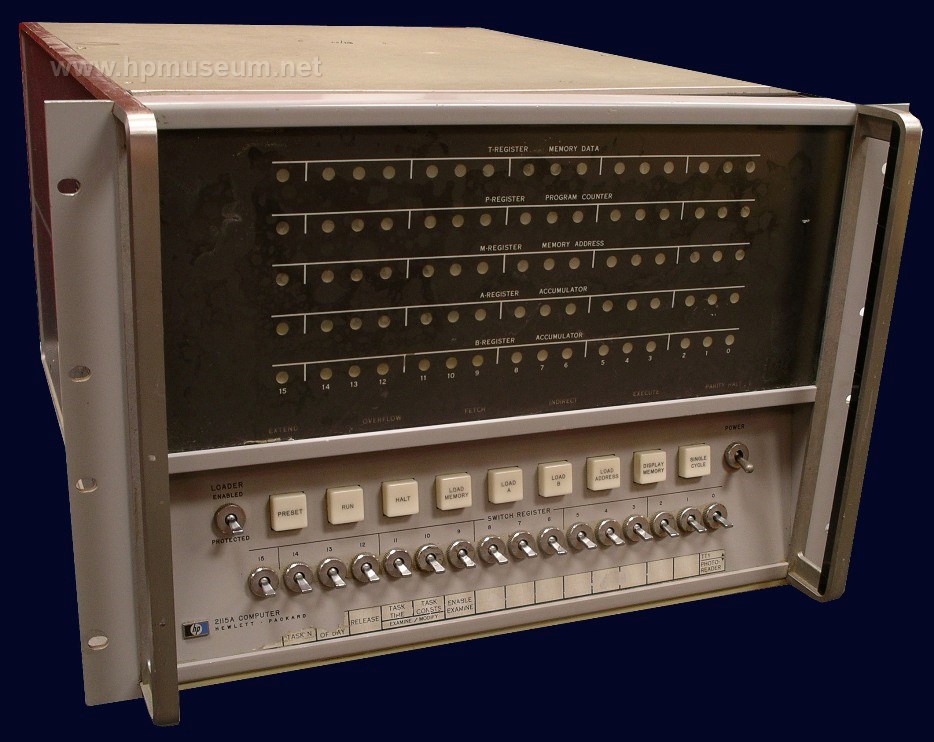
The Vancouver School Board had three Hewlett Packard 2115 minicomputers, located at different high-schools, unfortunately not mine. We wrote our programs in the BASIC programming language on optical mark cards, optimized for BASIC. Still, it was laborious and error prone. Every day a deliver person would show up at the school and retrieve the decks of cards with our programs on them, and take them to one of the schools with a computer. The people there would run our deck through the card reader, and wrap the deck with the output from the line printer and send it back to use. Typical turn-around was 3 days, 2 if you got lucky. Proofreading your code was exceptionally important to avoid disappointment!


Once a week, in the evenings, we could go to one of the schools with a computer. They had the computer, card reader, line printer, and a teletype with a paper tape punch/reader. It was significantly more productive to work on your programs there - especially if no-one else showed up and you could have the teletype to yourself - making it a 'personal computer'

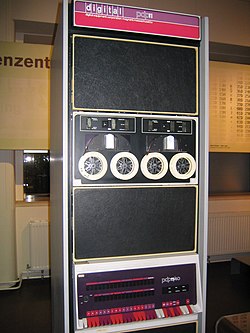
That same year I actually went to the launch of the Digital Equipment Corporation PDP-11, at the Blue Boy Hotel in Vancouver. I don't know what all these adults thought of having a 12 year old kid in the room, but most of them were polite and answered my questions without watering it down or treating me like a kid. It was not until many years later I learned to appreciate the significance of the PDP-11.

Before the end of the year, the high schools did not have enough resources to help me learn more, and my math teacher had reached the limits of what he knew about computers and programming. Fortunately the bus service in Vancouver was very good in those days. Eventually I showed up at the University of British Columbia where they had this place called the Student Terminal. It was a room filled with card/key punch machines (some could even do lower case), a card reader, and a line printer. You could go buy tickets at the book store for 50 cents apiece, and one ticket gave you one run of your program. This was great for me because no-one cared if I used the facility as long as I had my blue tickets.

UBC had and IBM 360/67 running the Michigan Terminal System. Looking back on MTS I can honestly say it was the first computer operating system that was specifically designed with a relatively easy to use user interface, and was way ahead of its time in that regard.

I was finally able to learn Fortran, WATFIV actually. Fortran did not seem to have any particular advantage over BASIC, in fact it was significantly more awkward to code in. As a child it was just a challenge and I had no wisdom to evaluate language design.

My next challenge was assembler - IBM 360 assembler in fact. I found a nice gentleman in the UBC Computing Center to to show me assembler, but I could not seem to get the hang of it. One day on the weekend I went to the 'front desk' to ask for help and they had one of the computer operators help me. He showed me how much more easy assembler was if you used the predefined macros for the Operating Systems API and I quickly go the hang of it. It was way more work than BASIC or Fortran, but it revealed what the computer was actually doing. When I was in grade 12 I audited a 3rd year course in assembler at UBC and received a 98% grade - all the previous experience paid off.

Over the course of high school I learned various other programming languages - Focal (sort of like BASIC), APL (truly weird), etc. How to design logic circuits with NAND and NOR gates and to create JK-Flip-Flops and create a binary counter. According to DEC, it was less expensive to implement logic with NAND and NOR gates than AND an OR gates.

By the time I graduate high-school when I started as an undergraduate at UBC I went straight in to 3 year Computing Science courses. My original goal was to get a PhD, but by the time I finished my BSc I was really sick of school. I eventually completed my MSc at Simon Fraser University in 1995. My faculty adviser tried to get me to do a PhD, but again I was sick of school because I was also working full time.

As it stand today, I have over 30 years of computer experience. In the beginning I found computers truly fascinating and they inspired me to learn as much as I could. As of today, I still find computers fascinating, but I also find them horribly exasperating and dehumanizing. It is not that computers as a technology are particularly exasperating and dehumanizing, it is really how people have chosen to use this technology that reveals the best and worst of us as people.